Audio Feedback (Larsen Effect): Complete Guide to Understanding and Preventing It

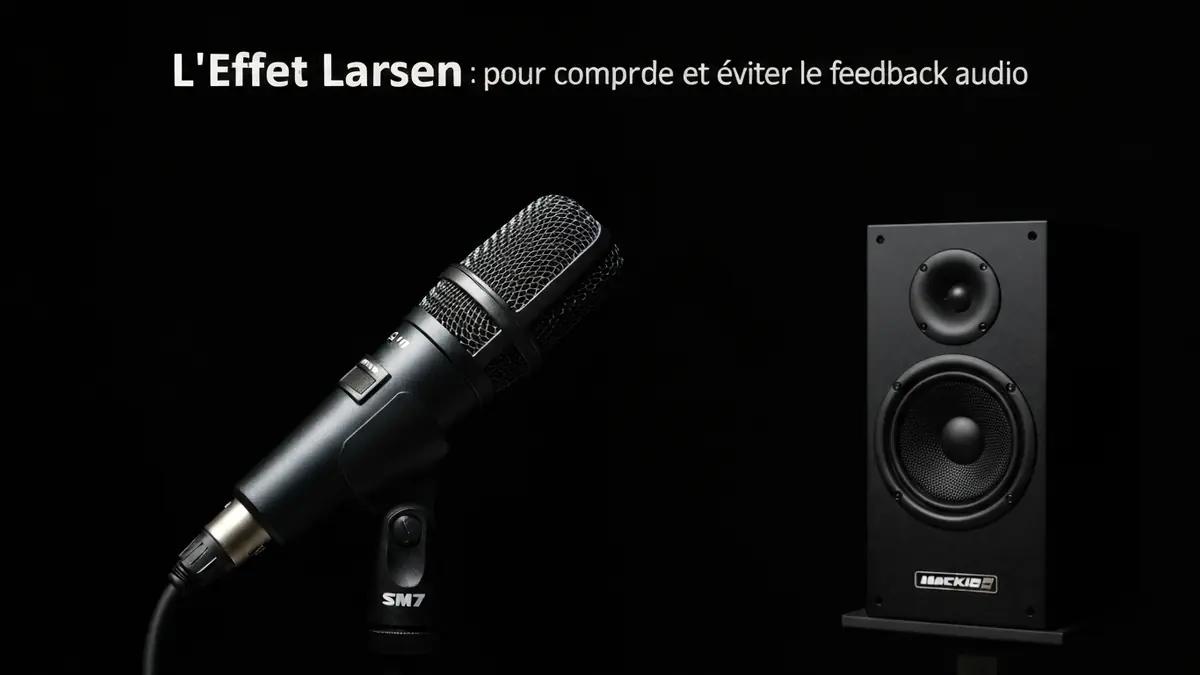
Les 3 points à retenir
- 1The Feedback Loop
- 2Loop Gain: The Critical Factor
- 3Why a Specific Frequency
What Is Audio Feedback (the Larsen Effect)?
Audio feedback — also known as the Larsen effect — is the loud, high-pitched squeal that occurs when sound from a speaker is picked up by a microphone, amplified, and sent back through the speaker in a continuous loop. Each pass through the loop adds energy to the signal, and within a fraction of a second the system produces a piercing, sustained tone.
The phenomenon is named after Danish physicist Soren Absalon Larsen (1871-1957), who first described it scientifically. In French-speaking countries the term "effet Larsen" is universally used; in English we typically call it audio feedback or simply "feedback."
Audio feedback is not a malfunction — it is a natural behavior of any system where a microphone and a speaker share the same acoustic space. Understanding the mechanism is the first step toward preventing it.
How Audio Feedback Works: The Physics
The Feedback Loop
The chain is straightforward:
- Sound source — a voice or instrument reaches the microphone
- Microphone — converts sound waves into an electrical signal
- Amplifier — boosts the signal (preamp, mixer, power amp)
- Speaker — converts the amplified signal back into sound waves
- Acoustic path — sound travels through the room back to the microphone
- Loop restarts — the captured sound is amplified again
Loop Gain: The Critical Factor
The key parameter is loop gain — the ratio of energy returning to the microphone after one complete cycle versus the energy that entered initially.
- Loop gain < 1: energy is lost each cycle. The system is stable. No feedback.
- Loop gain = 1: the signal sustains indefinitely. The system sits on the edge.
- Loop gain > 1: energy increases each cycle. The system oscillates — feedback occurs.
Why a Specific Frequency?
Feedback produces a tone at a single frequency, not noise. That frequency is the one where the combined response of the microphone, amplifier, speaker, and room acoustics provides the highest gain. It is often a room resonance or a peak in the speaker or microphone response curve — typically in the 2 kHz to 4 kHz range, which is why feedback usually sounds like a high-pitched squeal.
Common Situations Where Feedback Occurs
- Live concerts and events — a singer walks in front of the PA speakers, or stage monitors are turned up too high
- Karaoke systems — an omnidirectional mic, a powerful speaker, and an untreated living room are a recipe for feedback
- Conference rooms — multiple open microphones increase total loop gain
- Home cinema with a microphone — wireless karaoke mics combined with a surround sound system
- Hearing aids — the microphone and receiver are millimeters apart; a poor ear mold fit causes the classic hearing-aid whistle
- Speakerphone calls — especially when two phones on speaker are in the same room
How to Prevent and Fix Audio Feedback
1. Distance
Keep the microphone behind and away from the speakers. The greater the distance, the lower the loop gain. Never stand or hold a mic in front of the PA.
2. Use a Directional (Cardioid) Microphone
Omnidirectional mics pick up sound from every direction, including from speakers behind them. A cardioid microphone rejects rear sound by 20-25 dB, drastically reducing feedback risk. For karaoke and basic live sound, a dynamic cardioid mic like the Shure SM58 is the safest choice.
3. Reduce Volume
Lowering the overall system gain is the simplest fix. If the loop gain drops below 1, feedback stops instantly. Find the sweet spot between adequate volume and the feedback threshold — this margin is called gain before feedback.
4. Parametric EQ
Identify the exact feedback frequency and cut it with a parametric equalizer using a narrow band (high Q). A 3-6 dB cut at the problem frequency is often enough to kill the feedback without noticeably affecting overall sound quality.
Use a real-time spectrum analyzer app on your phone (such as Spectroid for Android or Audio Spectrum Analyzer for iOS) to pinpoint the feedback frequency quickly.
5. Feedback Suppressors
Dedicated hardware like the dbx AFS2 or Behringer Shark DSP110 automatically detects and notches out feedback frequencies in real time. Software plugins (Waves X-FDBK, built-in modules on Yamaha or Allen & Heath digital consoles) do the same in the digital domain.
6. In-Ear Monitors (IEM)
On stage, replacing floor wedge monitors with in-ear monitors eliminates a major feedback source. No sound is projected into the room from the monitors, so the loop gain drops significantly.
7. Acoustic Treatment
Room reflections bounce speaker sound back toward the microphone via indirect paths. Absorptive panels, bass traps, heavy curtains, and carpets reduce these reflections and lower the feedback risk.
8. Ring Out the System
At soundcheck, slowly raise the mic gain until feedback starts. Identify the frequency, cut it with EQ, then raise the gain again until the next feedback appears. Repeat 4-8 times. This process — called ringing out — systematically eliminates all problem frequencies and maximizes your gain before feedback.
Never let feedback sustain at high volume. Prolonged feedback can blow tweeters, especially on budget speakers with limited protection circuits. Lower the volume or move the mic immediately.
Audio Feedback as a Musical Tool
Not all feedback is unwanted. Some musicians have turned it into art:
- Jimi Hendrix — the master of controlled guitar feedback, using proximity to his Marshall amps to create sustained, expressive tones
- The Beatles, "I Feel Fine" (1964) — one of the first recorded uses of intentional feedback in a studio recording
- My Bloody Valentine — Kevin Shields built the sonic identity of "Loveless" (1991) around layers of guitar feedback
- Sonic Youth, The Jesus and Mary Chain, Sunn O))) — genres like shoegaze, noise rock, and drone metal treat feedback as a core instrument
Guitar feedback works on the same principle: the amp's sound vibrates the guitar strings sympathetically, the pickups capture that vibration, and the loop sustains as long as the guitarist stands close to the amp.
Audio Feedback in Home Cinema
The most common home cinema feedback scenario involves wireless karaoke microphones paired with a surround sound system. The surround speakers behind and beside the listener are dangerously close to the mic.
Home cinema-specific solutions:
- Switch to stereo mode during karaoke to disable surround speakers
- Lower surround speaker volume — route the mic signal primarily to the front channels
- Use the mic EQ on your AV receiver or karaoke mixer to cut the 2-4 kHz range
- Choose a wireless cardioid dynamic mic over cheap omnidirectional karaoke mics
- Sing facing the front speakers with your back to the surrounds
- Consider an affordable feedback suppressor like the Behringer Shark DSP110 (~$50) if you do karaoke regularly
FAQ
Can audio feedback damage speakers?
Yes. Sustained feedback at high volume can burn out tweeters. The feedback signal is typically a high-frequency, high-amplitude continuous tone — exactly what stresses a tweeter's voice coil the most.
Why is feedback almost always high-pitched?
High frequencies have shorter wavelengths, are more easily reflected and concentrated in a room, and microphones/speakers often have response peaks in the 2-5 kHz range. Human hearing is also most sensitive in this range (Fletcher-Munson curve), making high-frequency feedback especially noticeable.
Does digital audio have feedback?
Yes. Feedback is an acoustic phenomenon, not an electronic one. Any system with a microphone and a speaker in the same space can produce it, whether the signal path is analog or digital. Digital latency may even shift the feedback frequency unpredictably.
What is the difference between echo, reverb, and feedback?
- Echo: a distinct repetition of a sound after a delay (> 50 ms)
- Reverb: many closely spaced reflections creating a sense of space — both echo and reverb decay naturally
- Feedback (Larsen effect): a self-reinforcing loop that grows in amplitude until it reaches system saturation — it does not decay on its own
Conclusion
Audio feedback is one of the most common — and most preventable — problems in any sound system. Whether you are setting up a home karaoke night, running live sound, or troubleshooting a conference room, the principles are the same: maximize the distance between mic and speakers, use directional microphones, manage your gain, and apply EQ where needed. With these fundamentals, you can enjoy your audio system feedback-free.

À propos de l'auteur
Marc Dubois
Rédacteur divertissement & musique
Mélomane et cinéphile, Marc explore l'univers du divertissement numérique, des plateformes de streaming aux équipements hi-fi haut de gamme.
You Might Also Like
Dolby Atmos at Home: A Complete Setup Guide
Everything you need to know about bringing immersive Dolby Atmos audio into your home theater — from equipment choices to room configuration and budget planning.
Denon: Complete Guide to Home Cinema Receivers and HiFi in 2026
Everything about Denon — AVR-S770H, AVR-X3800H home cinema receivers, soundbars, and turntables. Buyer's guide, comparison, and complete review of the Denon range.